Hey there! In this post, I’ll share with you my experience with the iPad 9th generation — the most affordable iPad that I think is the best for beginners, students, and artists on a budget.
In my review, I’ll focus on what’s important for artists: the drawing experience, screen size, number of layers, storage, and Apple Pencil compatibility.
So let’s find out if you should get iPad 9th generation for Procreate and drawing!

🤩 Join Art Club with Iva for access to popular PROCREATE classes, workshops, creative skills practice, my drawing process, references, Procreate brushes use inspiration, and more.

Join 1000s of artists and get my custom-made Procreate brushes - 🎨 Watercolor Brush Set, 🖌️ Gouache Brush Set, ✏️ Sketching Brush Set, and more ...
💡 Click on my post about the best iPad for Procreate if you are looking for a comparison of the new iPads for drawing on Procreate – iPad Pro 13″ M4, iPad Pro 11″ M4, iPad Air 13″ M2 & M3, iPad Air 11″ M2 & M3, iPad Mini 7 and iPad A16
iPad 9th Generation for Drawing and Procreate (Discontinued )
|
2025 Model

|
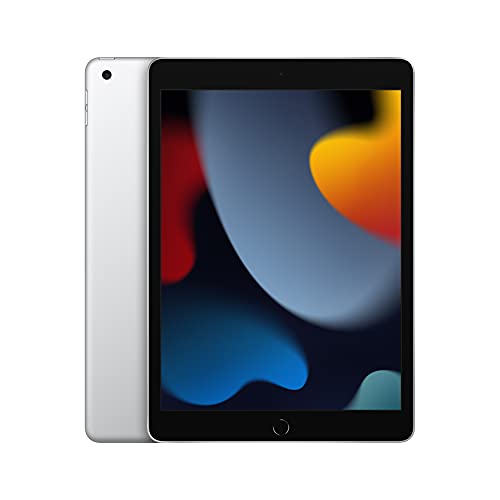
2021 Model
|
|
Description: Best Budget iPad for drawing and Procreate Apple A16 Chip :: 11-inch Liquid Retina LED Display with True Tone :: 2360-by-1640-pixel resolution :: 500 nits brightness :: ±10 hours Battery Life :: Early 2025 model :: Apple Pencil 1 compatible :: Get my popular Procreate Brushes |
Description: Apple A13 Chip :: 10.2-inch Retina LED Display with True Tone :: 2160-by-1620-pixel resolution :: 500 nits brightness :: ±10 hours Battery Life :: Late 2021 model :: Apple Pencil 1 compatible | Get my popular Procreate Brushes |
Best Budget iPad for drawing and Procreate
Apple A16 Chip :: 11-inch Liquid Retina LED Display with True Tone :: 2360-by-1640-pixel resolution :: 500 nits brightness :: ±10 hours Battery Life :: Early 2025 model :: Apple Pencil 1 compatible :: Get my popular Procreate Brushes
Apple A13 Chip :: 10.2-inch Retina LED Display with True Tone :: 2160-by-1620-pixel resolution :: 500 nits brightness :: ±10 hours Battery Life :: Late 2021 model :: Apple Pencil 1 compatible | Get my popular Procreate Brushes
Video: My Experience with iPad 9 for Drawing and Procreate

🤩 Grab my popular FREE Procreate Brush pack, plus color palettes, prompt lists, and more creative goodies!
Drawing Experience on iPad 9th Generation
Join 1000s of artists and get my custom-made Procreate brushes - 🎨 Watercolor Brush Set, 🖌️ Gouache Brush Set, ✏️ Sketching Brush Set, and more ...
If you are into tech specification, iPad 9th generation has a display matching its price point:
You are getting the following:
- A super high-definition resolution for super clear images
- 60Hz refresh rate for a satisfying drawing experience
- A wide color profile
While the design of the iPad 9th gen may feel a bit outdated compared to newer models, it still has its advantages!
When I was drawing with iPad 9, I really liked holding it on the side by the frame. This way, I wouldn’t accidentally touch the screen. This made drawing on it indoors and outdoors quite easy because my grip naturally felt much stronger than on the newer iPads.
Drawing on iPad 9th gen in Procreate was just like drawing with any other more expensive iPad. I only noticed a couple of issues … but at this price, I don’t even care!
The first thing I noticed when drawing was this tiny gap between the Apple Pencil and my drawing. This is caused by iPad 9 screen not being laminated, which means the top glass, touch layer, and display are separated by a tiny air gap.
The next thing I noticed was that the iPad 9 doesn’t have this anti-reflective coating, so it was often like looking into the mirror. It made drawing outside or against a window a little challenging. This can be solved by getting a Paperlike screen protector, which, as I explain in my article about best screen protectors for Procreate, is quite beneficial.
And the last thing I noticed was that there was a bit of lag when I was making fast strokes, compared to what I am used to with my iPad Pro 12.9″.
Don’t worry, though. If you are just starting out with Procreate, you will most likely not notice these small issues. I am a bit biased because I’ve been using my iPad Pro 12.9″ for a long time.
So to sum up, the drawing experience in Procreate on iPad 9 is satisfactory. It also supports a bunch of other drawing apps, so you will have a lot of fun drawing, doodling, and painting digitally!
Below is the drawing experience on my previous iPad Pro 10.5″, which has the same design as iPad 9.
iPad 9th Generation Screen Size Comparison


iPad 9 is a very portable iPad model.
It has a 10.2″ screen, so you can easily pick it up, hold and draw on it.
It perfectly fits into a bag, backpack, or even a purse!
Number of Procreate Layers on iPad 9th Generation


In my post about Procreate layer limits, I explain what impacts the number of Procreate layers on your iPad. It basically boils down to the size of RAM, iPadOS version, and Procreate version. The higher for all, the better!
Below is an example of the number of Procreate layers you will get with your iPad 9th generation.
Compared to iPad Pro and iPad Air models, this is not a lot of layers.
It means that if you’re planning to create complex artworks on your iPad 9, you’ll have to be a bit more selective and creative with your layers because you’ll have a limited amount of layers for larger canvases.
For example, If the tutorials you follow use large canvas sizes and you don’t want to be limited by the number of layers, you might have to think creatively. It’s certainly doable, but it also may mean you will want to, for example, get iPad Air for Procreate which has the same RAM as iPad Pro (except the 1TB and 2TB models).
| Canvas size | iPad 9th generation Number of layers in Procreate |
|---|---|
| 3000 x 3000px | 25 |
| 16″ x 16″ @300 DPI | 7 |
| A4 @300DPI | 26 |
| A3 @300DPI | 11 |
| A2 @300DPI | 3 |
Storage Options on iPad 9th Generation

As you see in the table below, iPad 9th generation, same as other cheaper iPads, only provides 2 storage options:
| iPad 9th generation | RAM |
|---|---|
| Storage 64GB | 4GB RAM |
| Storage 256GB | 4GB RAM |
If you will be saving only a couple of files on your iPad, or if you will be regularly backing up your iPad to an external hard drive, then you are good to go with the 64GB option. It will run Procreate and other drawing apps without a problem.
If you plan to save big artworks, files, and offline content, for example, from Netflix, YouTube, or Skillshare classes, then aim for the 256GB option.
Now, at the time of writing, the difference in the price between the iPad 9th gen 64GB model and the 256GB model is almost double!! So think about what is more important for you.
iPad 9th Gen Apple Pencil Compatibility
iPad 9th Generation is compatible with Apple Pencil 1st generation:
First Generation Apple Pencil :: Compatible with: iPad (6th, 7th, 8th, 9th (10.2″), 10th (10.9″), 11th (11″) generation, iPad mini (5th generation), iPad Air (3rd generation), iPad Pro 12.9-inch (1st, 2nd generation), iPad Pro 10.5-inch, iPad Pro 9.7-inch

To pair it, follow the steps below:
- Open the cap on Apple Pencil 1 to use the lightning connector
- Stick the Apple Pencil into the lightning connector on your iPad 9
- Accept the pairing request (happens only during initial setup)
- Use the Apple Pencil with Procreate or your favorite drawing app


I used to draw with Apple Pencil 1 on my first iPad Pro 10.5″. Now I use Apple Pencil 2 with my iPad Pro 12.9″
When I was drawing with it, I didn’t notice it initially, but my hand would get tired after prolonged use. It’s because this model of Apple Pencil has a very shiny surface that gets quite slippery when you use it for a long time. And don’t get me started on using it in the summer 😰
That’s why if you are getting iPad 9 with Apple Pencil 1, I recommend getting a special rubber cover for the pencil, which makes it easier to hold. This could prevent your hand from getting fatigued.
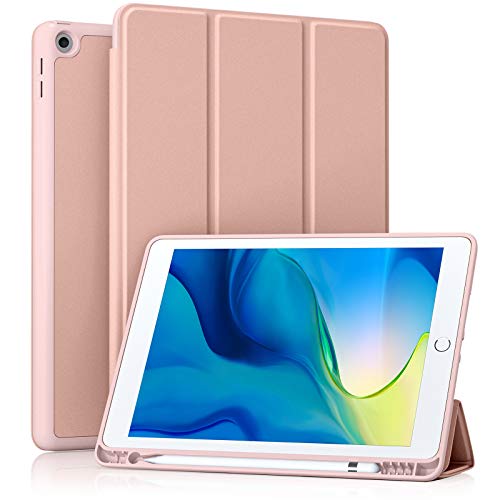
One more thing. Apple Pencil 1 has a cylinder shape, which means it easily rolls from uneven surfaces (like when your table is not even). That’s why I recommend a special iPad case with a pencil holder. It’s worth every penny! 😊
Case Compatible with iPad 10.2 Inch 2021/2020 iPad 9th/8th Generation & 2019 iPad 7th Generation with Pencil Holder, Protective Case with Soft TPU Back, Auto Sleep/Wake Cover
iPad 9th Generation Price
iPad 9th is the cheapest iPad that runs Procreate and uses Apple Pencil.
At the time of writing, the price of the iPad 9th generation with 64GB of storage space is ±$250 and goes up to ±$500 for the version with 256GB.
These are amazing prices, making iPad 9 an exceptional value for Procreate beginners and digital art hobbyists.
Who Should Get iPad 9th Generation for Drawing?

👩🏻💻 Get my Procreate Classes:
Iva’s Procreate classes
🖌 Get my Procreate Brushes:
Iva’s Procreate brushes
💡 Get my Procreate Tutorials:
Iva’s Procreate tutorials
So, who should, in my opinion, get the iPad 9?
The iPad Generation 9, in my opinion, is a great value for the price. It’s particularly suitable for beginners who want to explore drawing on the iPad and the world of digital art without breaking the bank.
So, to wrap up, the iPad Generation 9 is one of my top recommendations for beginners using Procreate.
It’s a fantastic value for the price and a wonderful tool to get you started on your digital art journey.
iPad 9th Generation Drawing Accessories
When you get your own iPad 9 for drawing and Procreate, also consider these useful accessories.
I strongly recommend the case with a pencil holder so you don’t lose it, and it protects the cap from getting broken!

|

|

|
|
Description: Case Compatible with iPad 10.2 Inch 2021/2020 iPad 9th/8th Generation & 2019 iPad 7th Generation with Pencil Holder, Protective Case with Soft TPU Back, Auto Sleep/Wake Cover |
Description: Matte Screen Protector for Drawing, Writing, and Note-taking like on Paper |
Description: I recommend you get them if you use a matte Paperlike screen protector |
Case Compatible with iPad 10.2 Inch 2021/2020 iPad 9th/8th Generation & 2019 iPad 7th Generation with Pencil Holder, Protective Case with Soft TPU Back, Auto Sleep/Wake Cover
Matte Screen Protector for Drawing, Writing, and Note-taking like on Paper
I recommend you get them if you use a matte Paperlike screen protector
Happy creating!
FAQs
Yes, Procreate works on iPad 9th gen! It’s actually one of the cheapest iPads that work with Procreate.
Yes, iPad 9th gen with 64GB storage is enough for Procreate. However, if you are saving a lot of offline content (videos, classes, tutorials), then I’d recommend getting iPad 9th gen with 256GB!
The cheapest iPad that works with Procreate is currently iPad 9th generation. It’s perfectly suitable for drawing on Procreate for beginners, students, and hobbyists.
Yes, iPad 9 is worth it for drawing. It runs Procreate and other drawing software and works with Apple Pencil 1st generation, providing you with an amazing drawing experience.
Apple Pencil 1st generation goes with iPad 9th generation.

Hi, I am Iva (rhymes with “viva”). I am a full-time self-taught artist behind Art Side of Life® and a Top Teacher on Skillshare. I have 15 years of experience in the creative field as a concept designer, illustrator, art director, and now freelance artist, content creator, and art instructor. My goal is to help you get your creative groove on with Procreate and make awesome art through practical classes, tutorials, Procreate brushes, and guides on art tools, supplies and resources. About me »


