Hi! 👋 Wondering why the iPad A16 is quickly becoming the best budget option for Procreate artists? I’ve tested it extensively, and here’s everything you need to know:

🤩 Join Art Club with Iva for access to popular PROCREATE classes, workshops, creative skills practice, my drawing process, references, Procreate brushes use inspiration, and more.

Join 1000s of artists and get my custom-made Procreate brushes - 🎨 Watercolor Brush Set, 🖌️ Gouache Brush Set, ✏️ Sketching Brush Set, and more ...
💡 See my post about the best iPad for Procreate if you are looking for a comparison of the new iPads for drawing on Procreate – iPad Pro 13″ M5/M4, iPad Pro 11″ M5/M4, iPad Air 13″ M4/M3/M2, iPad Air 11″ M4/M3/M2, iPad Mini 7 and iPad A16
Latest iPad A16 11th Generation for Procreate and Drawing
Best Budget iPad for drawing and Procreate
Apple A16 Chip :: 11-inch Liquid Retina LED Display with True Tone :: 2360-by-1640-pixel resolution :: 500 nits brightness :: ±10 hours Battery Life :: Early 2025 model :: Apple Pencil 1 compatible :: Get my popular Procreate Brushes

Video: Comparing iPad A16 with iPad Air M3 (M4)

🤩 Grab my popular FREE Procreate Brush pack, plus color palettes, prompt lists, and more creative goodies!
Drawing Experience on 2025 iPad A16 11th Generation

Join 1000s of artists and get my custom-made Procreate brushes - 🎨 Watercolor Brush Set, 🖌️ Gouache Brush Set, ✏️ Sketching Brush Set, and more ...
The iPad 11 uses the same display tech as the iPad 10:
It’s vibrant and runs on the sRGB color profile, so colors pop nicely.
When I draw, my artwork looks great on it, especially for the price point.
However, the screen isn’t laminated, which means you get a subtle tapping sound while drawing. It feels more like drawing on glass than paper. Plus, there’s no anti-reflective coating, so if you often work outdoors or in bright spaces, it might be a little tricky.
That’s why I totally recommend you get a Paperlike screen protector to decrease these reflections and have this natural drawing feeling!
Overall, I feel that, for the price, iPad A16 provides a good enough drawing experience on Procreate, and I’ve enjoyed it despite coming from my iPad Pro, which is Apple’s flagship model.

🌟 NEW Bubble-Free Butterfly Install System
For iPad 11 (A16 - 2025) & iPad 10 (2022) - also available for other models
True Paper-Feel, Protects Pencil Tip

And as is true to all iPad models (except iPad Pro), iPad A16 display also has the 60Hz refresh rate, which means you will notice this short lag when you are making long and fast strokes in Procreate.

On the plus side, If aesthetics are an essential factor in your device selection, you’re in for a treat.

The iPad A16 comes in multiple vibrant and exciting colors. You can choose a color that suits your personality and style, whether it’s an understated gray or a vibrant red. So, if you would love your tablet to be an extension of your aesthetic sense, the iPad A16 might be the perfect choice for you.
iPad A16 Size and Weight

The new iPad 11 comes in a single 11-inch size, which makes it really portable.
Weight-wise, it feels like carrying a hardcover sketchbook with about 50 or 60 pages.
If you’re used to taking a sketchbook everywhere, you’ll love how easy this iPad is to carry around.
Number of Procreate Layers on iPad A16

iPad A16 comes with a great upgrade in terms of RAM, offering 6GB, a very nice upgrade from the previous generation’s 4 GB.
Based on my tests, you will be getting this many Procreate layers:
| Canvas size | iPad A16 11th generation Number of layers in Procreate |
|---|---|
| 3000 x 3000px | 70 |
| 16″ x 16″ @300 DPI | 25 |
| A4 @300DPI | 73 |
| A3 @300DPI | 34 |
| A2 @300DPI | 15 |
In Procreate Dreams, you’re looking at 200 content tracks and one 4K video track.
Not bad at all for this price.
Storage Options on iPad A16

Storage is a major win on iPad A16 compared to iPad 10.
It starts at 128 GB, with options going up to 256 GB and 512 GB. Compared to the old iPad 10, which had only 64 GB at the base, this gives you way more room for apps, big Procreate files, and tons of reference images.
I think the 128 GB is a really solid starting point for most artists.
| iPad A16 11th generation | RAM |
|---|---|
| Storage 128GB | 6GB RAM |
| Storage 256GB | 6GB RAM |
| Storage 512GB | 6GB RAM |
My simple rule is this. If you will work on big artworks, download offline content such as videos from Netflix, YouTube, and Skillshare, get the 256GB or 512GB model.
It will save you from the headache of organizing and saving your files to an external hard drive.
iPad A16 Apple Pencil Compatibility
First Generation Apple Pencil :: Compatible with: iPad (6th, 7th, 8th, 9th (10.2″), 10th (10.9″), 11th (11″) generation, iPad mini (5th generation), iPad Air (3rd generation), iPad Pro 12.9-inch (1st, 2nd generation), iPad Pro 10.5-inch, iPad Pro 9.7-inch

The iPad A16 is compatible with the Apple Pencil 1st generation, which I’ve used a lot in my early Procreate days.
You’ll need a cable adapter to pair and charge it.
Also, while the iPad 11 supports the USB-C Apple Pencil, I don’t recommend it for Procreate users because it doesn’t have pressure sensitivity, which is critical for real digital painting.
Below you see how it works:

One helpful note.
Make sure you get the case with a pencil holder. This will help you save your Apple Pencil from getting lost. Because it really does like to roll away 😊
MoKo Case with Pencil Holder, Smart Trifold Protective iPad Case with Soft TPU Back Stand Cover, Auto Wake/Sleep, Different Colors

iPad A16 Price
I think iPad 11 is the best budget iPad for drawing and Procreate!
At the time of writing, it starts at $350, making it the best brand-new, budget-friendly iPad option if you want to dive into Procreate without looking for refurbished models.
Best Budget iPad for drawing and Procreate
Apple A16 Chip :: 11-inch Liquid Retina LED Display with True Tone :: 2360-by-1640-pixel resolution :: 500 nits brightness :: ±10 hours Battery Life :: Early 2025 model :: Apple Pencil 1 compatible :: Get my popular Procreate Brushes
Who Should Get iPad A16 11th Generation for Drawing?

👩🏻💻 Get my Procreate Classes:
Iva’s Procreate classes
🖌 Get my Procreate Brushes:
Iva’s Procreate brushes
💡 Get my Procreate Tutorials:
Iva’s Procreate tutorials
So, who do I think should get the iPad A16 11th generation?
If you’re new to digital art, on a tighter budget, or looking to buy an iPad for a family member (like a niece, nephew, or your own kids), the iPad 11 is a great pick. It’s also perfect if you’re a traditional artist who wants to explore digital painting without a huge investment. If you’re just starting your art journey and unsure how much you’ll draw, this is the one I’d recommend.
iPad A16 Generation Drawing Accessories
When you get your own iPad A16 for drawing and Procreate, also consider these useful accessories. If you get only one thing, make sure it’s the case with a Pencil holder. You will thank me later 😊
MoKo Case with Pencil Holder, Smart Trifold Protective iPad Case with Soft TPU Back Stand Cover, Auto Wake/Sleep, Different Colors

🌟 NEW Bubble-Free Butterfly Install System
For iPad 11 (A16 - 2025) & iPad 10 (2022)
True Paper-Feel, Protects Pencil Tip
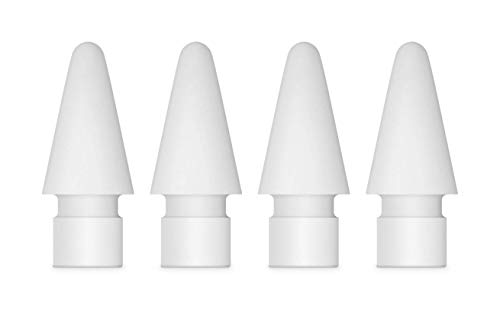
I recommend you get them if you use a matte Paperlike screen protector
Summary
Bottom line: The iPad 11 is the best budget option for Procreate users right now.
It gives you a great drawing experience, enough storage, solid layer counts, and Apple Pencil 1 support at a friendly price. In my experience, it’s the ideal starter iPad for any artist who wants to get serious about digital art without breaking the bank.
Happy drawing!
Lis cet article en français 🇫🇷 : 👩🏻💻 iPad A16 pour Procreate, les graphistes et les artistes 🧑🏻🎨
Lies diesen Artikel auf Deutsch 🇩🇪 : 🧑🏻🎨 iPad A16 zum Zeichnen und Procreate

Hi, I am Iva (rhymes with “viva”). I am a full-time self-taught artist behind Art Side of Life® and a Top Teacher on Skillshare. I have 15 years of experience in the creative field as a concept designer, illustrator, art director, and now freelance artist, content creator, and art instructor. My goal is to help you get your creative groove on with Procreate and make awesome art through practical classes, tutorials, Procreate brushes, and guides on art tools, supplies and resources. About me »


